Some time back, I wrote a Going Paperless post called “Creating a Digital Version of Your House” in which I described how I use tools like Skitch and Penultimate to capture floor plans and measurements around the house that might be useful to have when I am away–say at the hardware store. While I was away on my Internet vacation, it occurred to me, as I was measuring my bookshelves, that it might be equally useful to have a digital version of my bookshelves in Evernote. With something like 1,100 books, I can’t always remember if I happen to have a particular book or not, and it might be useful to have a quick reference.
Let me back up a moment and admit that yes, I still have paper books. The books on my bookshelves are part of a collection of books I’ve been growing since high school. They consist of science fiction books, books on science, and history books, as well as some miscellaneous books thrown in for good measure. Many of the books are pretty rare in their respective areas, and many more are signed by authors I admire, or who have since become friends of mine. I know there are database systems out there for keeping track of books, and I’ve tried many of them but they are too time consuming for me. It occurred to me that, thanks to Evernote’s ability to identify text in images and allow you to search that text, an “image library” of my books might be just the trick.
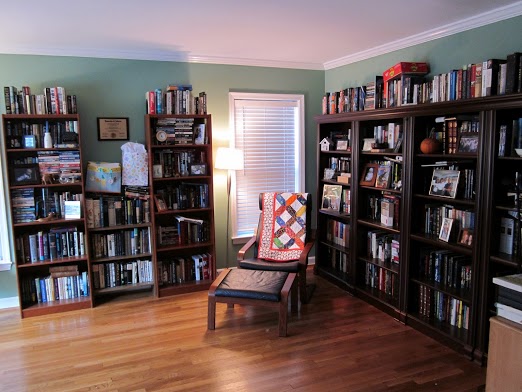
My process for doing this was pretty simple, and highly dependent on Evernote to do much of the work for me. For those who want to reproduce my results, here’s what to do:
- Take a picture of each shelf on my bookshelf. (The higher resolution the picture, the better).
- Create a note for each picture.
- Give a name to each note. I worked clockwise around my office. I numbered each bookcase and each shelf within the bookcase so that I could keep my note titles simple: “Bookcase 2, Shelf 4”, etc.
- Collect all of the notes together in a “Books” notebook in my “Home” notebook stack.
- Sync the notes with the Evernote server and allow Evernote to fill in the search data for the images.
The results are pretty cool. Here is a sample:

If I want to search for a particular book, I just type in my search into Evernote and see the results. For instance, say I want to search for the novel Rollback by Robert J. Sawyer. I type the word “Rollback” into the Search Bar and here are the results:

If I then open up the first note with the image of the bookshelf, I see the following:

Note that in this image, the word “Rollback” on the spine of the book has been highlighted (I circled it). Compare that to the same image above where it is not highlighted. The highlighting indicates where in the image my search term was located. This is convenient for 2 reasons:
- I don’t have to maintain a separate list of the titles that show up in the image. Evernote can detect them.
- When I search, it highlights where on the shelf I can find the title.
Since the note title tells me which bookcase and which shelf number and the search result shows me where on the shelf the book is located, I can go to my shelf and find the book instantly.
What if the books on the shelf change?
I suppose if you add books to your shelves frequently or rearrange your books a lot, this could be a problem. I don’t and so for me it isn’t. Most of the books I get these days are e-books. About the only time I get paper books is when I am adding something to my collection–like when a friend sends me a signed book, or I acquire a rare book. I’ll add the book to the shelf, snap a photo, and update the note, removing the old photo and replacing it with the new one.
Other uses
I mentioned signed books and rare books. In addition to capturing the books on my shelves, I also capture some individual books. I’ll snap images of books that have been signed and/or books that are pretty rare. For instance, using Rollback as an example, Rob signed that book for me the first time I met him, not long after my first short story sale back in 2007. So I snapped a photo of the book and the signature page and have a note in Evernote with both images:

As far as rare books go, I do the same thing. I have 3 books, for instance, signed by Isaac Asimov. I never got to meet Asimov, but he is one of my favorite authors. One of these books is a pretty rare paperback of his novel The Caves of Steel:

This has turned out to be a quick and simple way for me to maintain a pretty good inventory of my books, one that I can access anywhere through simple searches in Evernote, and one that can be updated by simply replacing one photo of a shelf with another. It works well for me.
If you have a suggestion for a future Going Paperless post, let know me. Send it to me at feedback [at] jamietoddrubin.com. As always, this post and all of my Going Paperless posts is also available on Pinterest.
Leave a Reply to PamelaCancel reply